Awake when you need it.
Asleep when you don't.
StayUp is the keep-awake app Windows never shipped. One sun-shaped button keeps your PC — and, if you want, your screen — awake: forever, for 30 minutes, until 18:00, while Zoom is running, or every workday from 9 to 6. Then it gets out of your way, in the tray.
3-DAY FREE TRIAL · ONE-TIME · 2 PCs · 14-DAY REFUND · WINDOWS 10/11

Press the sun. That's the manual.
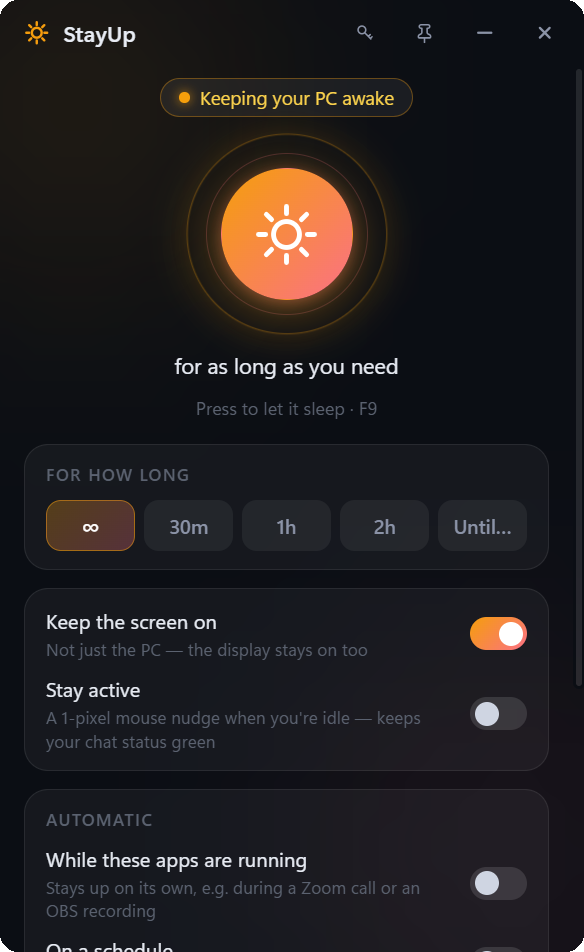
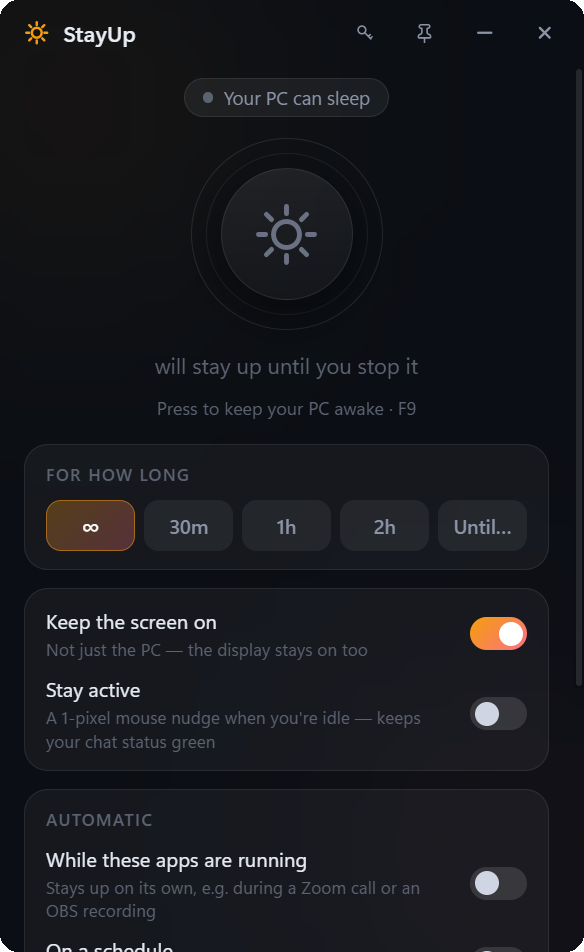
No settings maze, no scripting. The button glows while your PC is being kept awake, the pill tells you why, and the countdown tells you for how long. Press again — or hit F9 from anywhere — and your PC is free to sleep.
Small app. Complete idea.
Everything a keep-awake tool should have — and nothing it shouldn't. No accounts, no cloud, no “suite”.
Every duration that matters
Forever, 30 minutes, 1 hour, 2 hours, or until a clock time — “stay up until 18:00” is one tap. When time's up, a gentle chime and your PC is free again.
Screen on, or just the PC
Keep the display lit for reading and presenting, or let it switch off while downloads and builds keep running underneath. Your choice, one switch.
While these apps run
Pick the apps that matter — Zoom, OBS, your backup tool — and StayUp keeps the PC awake exactly while they're running. It stands down on its own when they close.
On a schedule
Awake every day between two times — 9:00 to 18:00, or 22:00 to 6:00 for night jobs. Overnight ranges just work.
Stay active
An optional 1-pixel mouse nudge when you've been idle a minute keeps idle-based status dots accurate while you step away. Off by default; it's synthetic input, which Windows flags as such.
A hotkey from anywhere
F9 toggles StayUp from inside any app, and you can rebind it in one click — handy on laptops where the F-keys moonlight as media keys.
Lives in the tray
Close the window and StayUp keeps working from the system tray: the icon glows while it's holding your PC awake, and a right-click gives you toggle and quit.
100% local & private
One small portable .exe. No telemetry, no analytics, no cloud, no account. It talks to the internet only to check your license key.
The best keep-awake session is the one you never start.
Most tools make you remember to turn them on — and worse, remember to turn them off. StayUp can watch for you instead:
- Presenting or recording? “While Zoom is running” means never going dark mid-meeting and never leaving your PC insomniac all evening after it.
- Long build, render or download? Add the app once; StayUp holds the door open only while it works.
- Same hours every day? A daily window keeps your workday awake and lets your nights sleep.
- Start with Windows, sit in the tray, and the whole thing runs itself.
Ten seconds to get it.
Pick how long
Forever, a preset, or “until 18:00”. StayUp remembers your favourite, so next time it's already selected.
Press the sun
Or hit F9 from any app. The button glows, the pill says why, the countdown says how long. Under the hood it's the documented Windows power API — no hacks.
Get on with your day
Close the window; the tray icon keeps watch. Automatic rules start and stop sessions for you, and when time's up your PC simply goes back to normal.
One price. In the open.
No tiers, no subscription, no “contact us”. The price on this page is the whole story.

- Every feature — durations, per-app rules, schedule, stay active, hotkey, tray
- License valid on 2 PCs, movable in one click
- All 1.x updates included
- 14-day money-back guarantee
- Doesn't override IT-enforced lock policies, and doesn't block Windows Update — by design
SECURE CHECKOUT & EU VAT HANDLED BY LEMON SQUEEZY · INSTANT KEY BY EMAIL
Not sure yet? Download the free trial — 3 days with everything unlocked, no signup.
Questions, answered.
Is there a free trial?
Yes. Download StayUp and you get 3 days with everything unlocked — no signup, no card. When the trial ends the app locks until you enter a key. It’s the same file buyers get: a license key simply unlocks it.
Is StayUp a mouse jiggler?
By default, no. StayUp's main mode uses the documented Windows power API, which keeps the PC awake without simulating any input at all. There is an optional Stay active mode — off by default — that moves the cursor by one pixel when you've been idle for a minute, so idle-based status dots stay accurate while you step away. That's synthetic input, which Windows flags as injected; it isn't “undetectable”, and no jiggler is.
Will my Teams or Slack status stay green?
With Stay active switched on, yes for apps that follow the Windows idle timer — which includes Teams and Slack today. Apps that apply their own rules may behave differently, and we won't promise what we don't control.
Does StayUp stop Windows Update from restarting my PC?
No. Keeping the PC awake and blocking a scheduled update restart are different mechanisms, and StayUp doesn't interfere with updates. If Windows has decided to reboot at 3 am, take it up with Windows — we know how that feels.
Will it work on a company laptop?
Usually yes — StayUp needs no admin rights and no installation, so it runs where most tools can't even be installed. But lock policies enforced by your IT department (forced lock timers, MDM rules) can override any keep-awake tool, StayUp included. If your IT enforces a lock, that's a decision to respect, not to work around.
What does it do to my laptop battery?
Exactly what you asked it to: a PC that stays awake uses more battery than one that sleeps. That's why the timed modes exist — “30 minutes” or “until 18:00” give you the awake time you need without an insomniac laptop in your bag.
Does StayUp need administrator rights? Do I need to install it?
No and no. It's a single portable .exe: download, double-click, done. It runs as a normal user, with no installer, no drivers and no services.
Is it a subscription?
No. $8.99 once. The license works on 2 PCs at the same time and you can move it with one click. All 1.x updates are included.
Does StayUp work offline?
Yes. It checks your license online at launch and keeps working for a few days between checks, so a flight or a weekend off-grid is never a problem.
Why does Windows warn me the first time I run it?
The file isn't code-signed yet, so Windows SmartScreen is cautious with new files — as it should be. Click More info, then Run anyway. The download is exactly the file we published, from this site only. Prefer no prompt at all? Install from the Microsoft Store: same app, same trial.
What are the system requirements?
Windows 10 or 11, 64-bit. Nothing else to install: the WebView2 runtime StayUp uses ships with Windows 11, and with Microsoft Edge on Windows 10.
What if StayUp is not for me?
Email [email protected] within 14 days and you get your money back, no argument. Write even if you're past the window: most problems turn out to be a five-minute fix. Your statutory rights as a consumer are unaffected.